

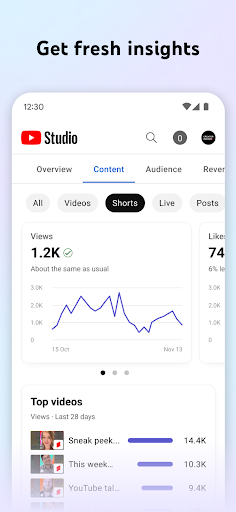

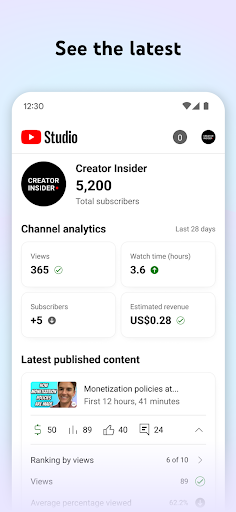
YouTube Studio is the official tool provided by YouTube, which allows users to upload, edit and manage videos. The software provides functions such as video analysis, community posts, and channel customization, which aims to help users better manage and promote their YouTube channels. The user interface is friendly, suitable for beginners and professionals.

How to use YouTube Studio?
The process of using YouTube Studio is roughly as follows:
Start the network browser and open the YouTube Studio website.
Log in to Youtube account (if you have not logged in).
In the sidebar on the left side of YouTube Studio, you can browse various functions and options. For example, you can click "Video" to manage the uploaded videos, or click "Analysis" to view the performance data of the video.
If you want to customize the appearance of the channel, you can roll to the bottom of the sidebar and click "Custom". On the "channel customization" page, you can choose to change the banner picture, channel icon, etc.
When uploading videos, you can add details such as title, description, label and other details to the video, and select the privacy settings of the video (for example, open, non -public or only specific users to watch).
You can use YouTube Studio's analysis tools to monitor the performance of the channel and video and view the audience's behavior data. These data can help you understand which content is more popular and how to improve your video content.
Is Youtube Studio easy to use?
Whether Youtube Studio is easy to use depends mainly on your needs and expectations. Here are some possible advantages and disadvantages:
Advantages: YouTube Studio provides rich functions and tools to help you better manage and promote your YouTube channel. The user interface is friendly and easy to use. At the same time, it also provides detailed data analysis functions to help you understand the behavior and preferences of the audience.
Disadvantages: For beginners, it may take some time to be familiar with the various functions and options of YouTube Studio. In addition, although YouTube Studio provides a lot of tools and functions, it may also have some limitations and limitations.
Youtube Studio core function
The core function of YouTube Studio includes:
Video management: You can upload, edit, delete, and sort the video, and set the privacy and release options of the video.
Data analysis: YouTube Studio provides detailed data analysis tools to help you understand data such as the overall performance of the channel, audience behavior, and watching duration. These data can help you optimize video content and promotion strategies.
Community management: You can interact with the audience, reply to comments and private messages, and create and manage community posts. This helps enhance your connection and interaction between you and the audience.
Channel custom: You can customize the appearance and style of the channel, including banner pictures, channel icons, background color, etc. This helps to shape your brand image and attract more audiences.
Video promotion: YouTube Studio provides some video promotion tools, such as advertising and SEO optimization suggestions. These tools can help you increase the exposure and view volume of video.