
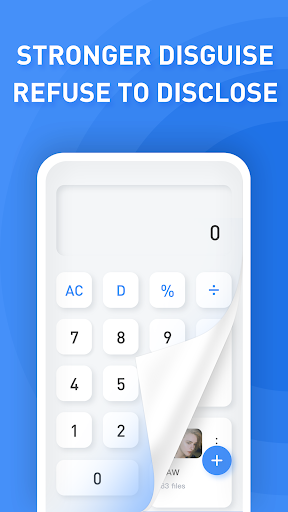


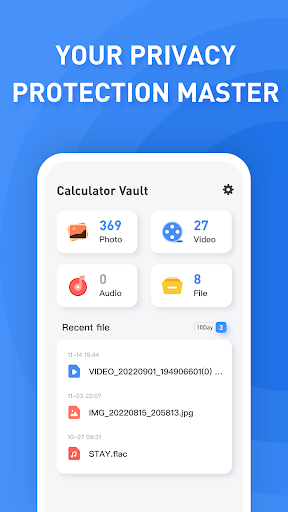
Calculator Vault is a mobile app that combines application hiding, image/video hiding, and security protection. It uses a normal calculator interface as a disguise, and users need to enter a password to enter the real hidden application interface. This software is designed to help users better protect their personal privacy and prevent sensitive information from being easily discovered by others. Calculator Vault not only supports hiding installed applications, but also provides a gallery module for hiding photos and videos to ensure that users' personal data is fully protected.
How to use Calculator Vault?
Download and install: First, download the installation package of Calculator Vault from the official website or a trusted app store, and install it according to the prompts.
Set a password: When you open the app for the first time, you need to set a password (usually 6 digits). This password will be used to enter the hidden application interface later, so be sure to remember it.
Hide application: On the main interface of Calculator Vault, click the corresponding button (such as the plus sign or import button), and then select the application you want to hide to hide. The specific operation may vary slightly depending on the application version, but the general process is similar.
Hide photos/videos: Calculator Vault also provides a gallery module where users can create folders and import photos and videos they want to hide. These files will be securely stored in the app's private folder to avoid being discovered by others.
Access hidden content: Every time you need to access a hidden app, photo or video, just open Calculator Vault and enter the password.
Is Calculator Vault free?
Yes, Calculator Vault is usually free. However, it should be noted that some apps may offer additional paid features or membership services, which may unlock more advanced features or provide a higher level of privacy protection. But basic app hiding and photo/video hiding features are provided free of charge in most cases.
Calculator Vault core features:
App hiding: Supports hiding all apps installed on the phone, without obtaining ROOT permissions.
Password protection: Protect the user's private data by setting a password to ensure that only the user can access the hidden content.
Gallery module: Provides a gallery module for hiding photos and videos, in which users can create private folders and import the pictures and video files they want to hide.
Hide notifications: Supports hiding notification information related to hidden apps to avoid exposing the user's privacy in the notification bar.
Multi-mode selection: Provide multiple notification modes for users to choose, such as all notifications, digital notifications only or no notifications, etc., to meet the needs of different users.
Security protection: Use advanced encryption technology to protect users' privacy data and ensure data security and privacy.